


Video downloader - Story Saver
Video Downloader Story Saver
I spent time with Video downloader - Story Saver as a social app built around saving videos and stories for later use. Its purpose is easy to understand: when a clip matters to me, I can use a dedicated downloader instead of relying on a platform’s limited save tools. That narrow focus is also its main appeal. It does not try to be a full social network, editing suite, or cloud library; it is aimed at making video-saving tasks more convenient.
The app is free to install, which makes trying it low-risk. It is listed for Everyone and works on Android devices running version 7.0 or later. The developer name shown for it is Video Downloader Story Saver. The current release is 3.19.0, and the app has already attracted more than 50 million installs, with an average score of 4.8 from roughly 1.1 million ratings. Those figures suggest that the basic idea is useful to a very large audience, although popularity alone does not guarantee that it will suit every phone or every social platform.
How the downloader fits into everyday social-media use
A focused tool rather than another social feed
What I like first is the app’s clear role. I open it when I want to save a video or story, not when I want to browse an endless feed. That difference matters because the usual social apps often make saved content dependent on their own accounts, feeds, or changing interfaces. A separate downloader can be more practical when I want a copy available for personal viewing later.
A realistic example is a short tutorial shared in a story. I may want to revisit the instructions while travelling, when the original story is no longer visible, or when scrolling through the social app would take too long. In that situation, a downloader is useful because it turns a temporary discovery into something I can organize with the rest of my phone’s media. The same workflow can help with a family clip, a recipe demonstration, or a public video I want to reference while preparing something offline.
There is an important distinction, though. Saving a file to a device is not the same as receiving permission to republish it. I would use the app for personal access and would ask the creator before sharing someone else’s work elsewhere. That habit is especially important with stories, since their temporary nature does not remove ownership or privacy expectations.
Related News

Instagram Is No Longer a Photo App. It Is an Attention Engine

Microsoft Teams Mobile: When Collaboration Becomes Navigation

How the NFL App Adapts to Android and iOS Updates

Temu: Elevate Your Shopping Experience to Billionaire Status

Why Traffic Rider Works Best as a Precision Reflex Game

How Google’s Find Hub Transforms Everyday Searches
What the free access means in practice
The free installation is the strongest part of the value proposition. I can test the basic workflow before deciding whether it belongs on my phone, rather than paying upfront for a task I might only perform occasionally. For a person who saves a few clips each week, that makes the app easier to justify than a paid utility with a similar narrow purpose.
The app also includes in-app purchases ranging from $0.49 to $119.99 per item. I would treat those purchases as optional spending rather than assume they are necessary for everyone. The sensible approach is to use the free experience first, identify whether it handles the sources and saving habits I actually have, and only then consider a purchase. A low-priced option may be reasonable for removing a specific annoyance, while a much higher-priced item deserves careful thought because the core app is already free to install.
That pricing range creates a trade-off: the entry point is approachable, but the best value depends on what each purchase changes and how frequently I use the downloader. Since occasional users may get everything they need without paying, heavy users should compare the benefit of any paid option with the cost of simply using the free workflow. I would not buy anything merely because the app has a strong rating.
Gallery
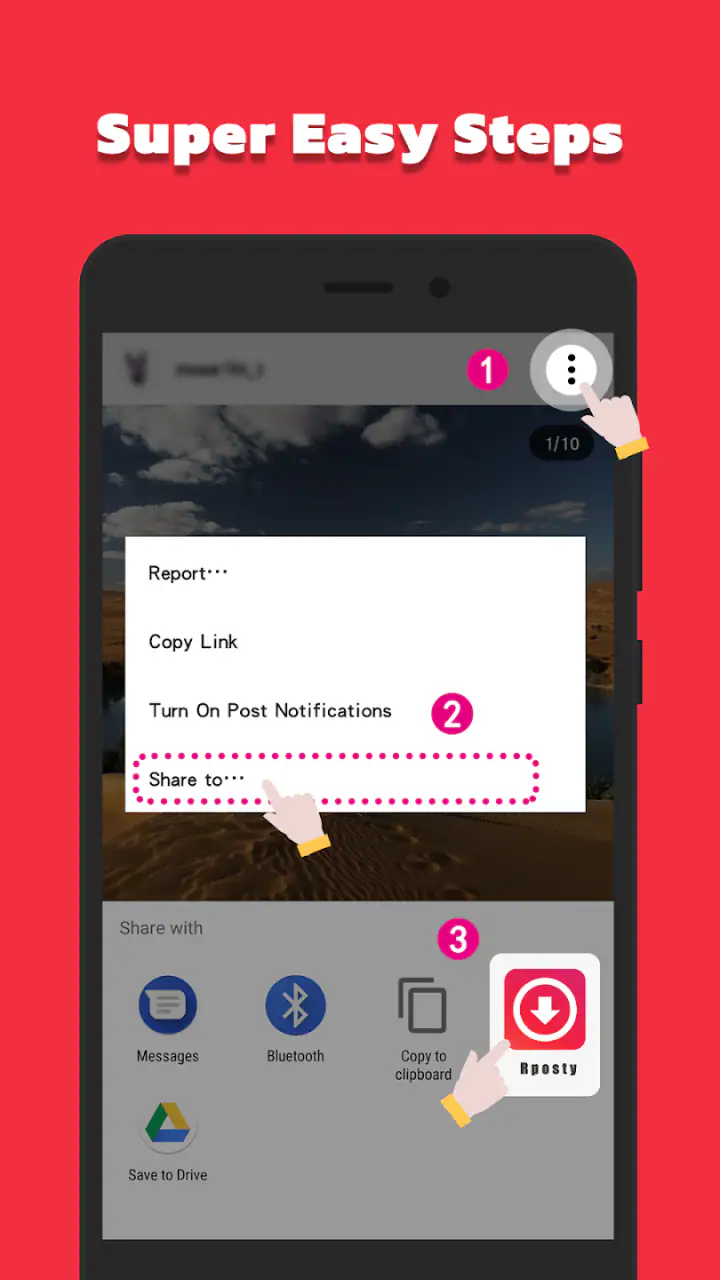
The workflow I found most practical
For regular use, I would keep the process simple. First, I would locate the video or story in the original social service and use the sharing or copying action available there. Then I would switch to the downloader, provide the relevant content reference, and check that I am working with the intended item before saving it. Finally, I would review the phone’s media area so I know where the file went and can remove duplicates later.
This small routine avoids a common problem with download tools: collecting files without a clear system. I would create a habit of saving only items I genuinely plan to watch or use. For example, tutorials could be handled one way, personal memories another, and temporary reference clips deleted after the task is finished. The app is more useful when it supports a deliberate archive rather than becoming a second, disorganized feed.
Another practical tip is to save important material soon after finding it. Stories are temporary by nature, and waiting until later can mean the source is no longer available. I would also check that the phone has enough storage before building a large collection. The app’s job is to make saving easier, but it cannot make an unlimited media library convenient by itself.
Where it is stronger than ordinary alternatives
The standard alternative is simply using a platform’s built-in save or bookmark function. That option is often better when I only need to remember where a post is, because it avoids filling local storage and keeps the creator connected to the content. Bookmarks are also more respectful when I do not need a personal copy.
Video downloader - Story Saver becomes more attractive when I need local access, when the original item is temporary, or when I want to keep a reference outside a particular feed. A browser-based downloader may work for one-off tasks, but opening a website, dealing with pop-ups, and moving files manually can feel slower on a phone. A screen recorder is another fallback, yet it can capture notifications, interface elements, or uneven playback instead of producing a clean saved item.
The trade-off is that a dedicated downloader depends more heavily on the source workflow. If a platform changes how its content is shared or protected, the experience may become less smooth. Built-in bookmarks usually remain the safer choice for simple discovery, while a separate downloader is better for people who specifically need local copies and are willing to manage them responsibly.
Small details that affect the experience
One non-obvious strength is the separation between finding content and keeping it. I can discover something in a social app, decide whether it deserves a place on my phone, and then use the downloader as a deliberate second step. That pause is useful: it reduces accidental saving and encourages me to think about whether I have a legitimate reason to keep the clip.
A second useful insight is that saving can support short-term projects, not just permanent collections. I might gather a few cooking demonstrations before preparing a meal, keep exercise instructions for a weekend routine, or store a public event clip while making notes. In those cases, the best workflow is to set a deletion point in advance. Once the project is finished, I can remove the files and avoid turning temporary reference material into clutter.
A third trade-off concerns convenience versus control. A specialized app may reduce the number of steps compared with manual recording, but it also adds another app to a sensitive part of my media routine. I would therefore review what I am saving, keep the app updated, and avoid entering account credentials into a downloader unless I fully understand why they are needed. For ordinary public content, I prefer a workflow that uses sharing or copying rather than handing over login details.
Limitations I would consider before installing
The app is not the right answer for every kind of social-media saving. If my main goal is to bookmark posts and return to them inside the original platform, the built-in feature is simpler and avoids local duplicates. If I need serious editing, captions, trimming, format conversion, or a structured media archive, I would look for an app designed specifically for those jobs instead of expecting a downloader to cover them.
Temporary stories also create uncertainty in everyday use. A story may disappear, become unavailable, or be restricted by the original service before I can save it. That is not necessarily a flaw in this particular app; it is a limitation of working with content controlled by another platform. I would avoid assuming that every link or every account will behave identically.
Storage management is another real friction point. Downloading is easy to start and easy to forget, especially with short videos that seem small individually. Over time, repeated versions of the same clip can take up space and make the gallery harder to search. I would periodically sort by date, remove duplicates, and keep only files with a clear purpose.
There is also a privacy and ethics boundary that deserves more attention than a typical store description gives it. I would never treat the ability to save a story as permission to circulate it. Private material, personal messages, and content featuring other people should stay within the boundaries set by the creator or participants. For me, the app delivers the most value when it supports personal convenience without encouraging careless redistribution.
Who will get the most value from it?
This app makes the most sense for people who regularly encounter useful short-form videos and want local access. Students might keep visual explanations for revision, travellers could save practical clips before a trip, and hobbyists may collect instructions they want nearby while working. It can also suit someone who dislikes depending on a social feed to find the same reference again.
It is particularly appealing to an Android user with an older but supported phone, since the minimum requirement reaches back to Android 7.0. I would still judge the experience by the individual device, available storage, and the services I use most often. A large install base makes the app easy to consider, but it does not remove the need to test my own workflow.
People who save content only once in a while may not need more than the free access. For them, the main benefit is convenience without an upfront charge. Frequent users should think more carefully about organization, storage, and whether a paid item provides a meaningful improvement. The presence of purchases does not automatically make the app poor value, but it does mean I would evaluate each upgrade on its own merits.
I would skip it if I am uncomfortable managing downloaded media, if I only want bookmarks, or if I need professional-level handling of video files. I would also avoid using it as a way to collect other people’s work for reposting. In those cases, the built-in social tools, a dedicated editing application, or a more formal media-management solution would be a better fit.
My value judgement after using it
For me, the strongest argument is the combination of a free starting point and a very specific purpose. I can try the saving workflow without committing money, and the app has enough reach to show that the use case is not unusual. The average score of 4.8 and its broad adoption are encouraging signs, but I still see them as context rather than a substitute for checking whether the app works with my preferred social sources.
The paid side needs more restraint. With individual purchases spanning from $0.49 to $119.99, I would not describe every option as equally good value. Someone who saves occasionally may never need to pay. Someone who relies on the app daily might find a paid improvement worthwhile, but only after confirming exactly what it changes and whether that change saves enough time to matter.
My final recommendation is therefore conditional but positive. I would recommend Video downloader - Story Saver to a friend who wants a straightforward way to keep social videos or stories for personal reference and is happy to organize the results. I would tell that friend to begin with the free experience, avoid saving material without permission, and compare local downloads with ordinary bookmarks before building a collection.
The best value here is practical convenience, not unlimited collecting. Used selectively, the app can turn fleeting social discoveries into useful personal references. Used without a storage plan or respect for creators, it can quickly become unnecessary clutter. That balance is what determines whether this free social utility earns a permanent place on the phone.
FAQs for Video downloader - Story Saver
What platforms does Video Downloader - Story Saver support?
Video Downloader - Story Saver is available for both Android and iOS devices. Users can download the app from either the Google Play Store or the Apple App Store, depending on their device. It is compatible with most versions of Android and iOS, ensuring a wide range of usability across different smartphones and tablets.
How does Video Downloader - Story Saver ensure user privacy and data security?
The app is designed with privacy and security in mind. It does not store or share user data with third parties. Users can download and save content without providing sensitive personal information. Additionally, the app regularly updates its security protocols to safeguard user information against any potential threats.
Can Video Downloader - Story Saver download content from all social media platforms?
While Video Downloader - Story Saver supports a wide range of social media platforms, it may not be compatible with every single one. Users should check the app's description for a list of supported platforms, which typically includes popular sites like Instagram, Facebook, and TikTok, among others.
Is Video Downloader - Story Saver free to use, or are there in-app purchases?
The app is free to download and use, but it may offer in-app purchases for additional features. These can include ad-free experiences or enhanced downloading capabilities. Users can choose whether to upgrade based on their needs and preferences, ensuring a customizable experience.
What should I do if I encounter issues while using Video Downloader - Story Saver?
If users experience any issues, they can access the app’s support section, which offers troubleshooting guides and FAQs. Additionally, they can contact customer support through the app or the developer's website for personalized assistance. Regular updates also help fix bugs and improve performance.
Pros
- Easy to use interface for quick downloads.
- Supports multiple platforms like Instagram.
- Fast download speeds for large files.
- Provides high-quality video downloads.
- Allows batch downloading of stories.
Cons
- Contains ads that can interrupt usage.
- Requires login for some features.
- Limited editing tools for downloaded videos.
- No support for downloading live videos.
- Occasional crashes on older devices.


